> ## Documentation Index
> Fetch the complete documentation index at: https://docs.vigolium.com/llms.txt
> Use this file to discover all available pages before exploring further.
# Vigolium Overview
> Vigolium is a high-fidelity web vulnerability scanner written in Go. It combines deterministic, module-based scanning with AI-driven agentic analysis to provide broad and deep coverage of web application security issues.
 Vigolium is a high-fidelity web vulnerability scanner that fuses agentic AI with native speed, modularity, and precision. It combines deterministic multi-phase scanning with AI-driven autonomous analysis to deliver comprehensive security coverage, from injection flaws and access control issues to framework-specific vulnerabilities and blind out-of-band attacks.
The platform is built around three key components that work together to provide a complete vulnerability scanning solution.
## Key Components
The core scanning engine. Handles all scanning logic, module execution, and heavy lifting, from content discovery and browser-based spidering to active fuzzing and agentic AI scanning.
A self-hosted dashboard for visualizing scan results, managing projects, and tracking findings across your infrastructure. Deploy it on your own servers for full control over your data.
A cloud-based solution that provides managed scanning, team collaboration, and centralized reporting without the overhead of self-hosting.
## Scanning Mode
### Agentic Scan
Agentic scanning uses AI agents to drive or augment the scanning process. Invoked via `vigolium agent `. All AI dispatch is routed through the in-process **olium** engine, which supports eleven providers: `openai-codex-oauth`, `anthropic-api-key`, `anthropic-oauth`, `openai-api-key`, `openai-responses`, `anthropic-cli`, `anthropic-claude-sdk-bridge`, `anthropic-compatible`, `anthropic-vertex`, `google-vertex`, and `openai-compatible` (Ollama / OpenRouter / LM Studio / vLLM).
| Mode | Command | Description |
| ------------- | --------------------------------------- | ------------------------------------------------------------------------------------------------------------------------------------------------------------------------------------------------------------------------------------------------------------------------------------------------------------ |
| **Query** | `vigolium agent query` | Single-shot prompt execution. Good for code review, endpoint discovery, secret detection. No network scanning. |
| **Autopilot** | `vigolium agent autopilot` | Autonomous AI-driven pentest. The olium engine discovers endpoints, runs scans, and triages findings on its own, driving bash, file ops, and the vigolium CLI until it calls `halt_scan`. Supports diff-focused runs (`--diff`), `--intensity` preset bundles, and session resume. |
| **Swarm** | `vigolium agent swarm` | AI-guided pipeline for targeted single-request or full-scope (`--discover`) scanning. The master agent selects modules, generates custom JS scanner extensions, runs code audit and SAST, executes scans, and triages results, with native Go handling the heavy lifting while AI intervenes at checkpoints. |
| **Audit** | `vigolium agent audit` | Unified driver dispatcher for whitebox security audits — runs the embedded vigolium-audit harness, the standalone piolium harness, or both side-by-side under one parent scan. Modes: lite / balanced / deep. |
| **Piolium** | `vigolium agent audit --driver=piolium` | Pi-native whitebox audit driver, up to 17 phases at `deep`. Requires the `pi` runtime and the `piolium` extension installed separately. |
| **Olium** | `vigolium olium` / `vigolium ol` | Interactive TUI chat or one-shot non-interactive prompt, the underlying agent runtime. |
All scan-oriented modes support `--source` for source-aware analysis and store session artifacts (plans, extensions, output) under `~/.vigolium/agent-sessions/`. See [Setting Up the Agent](/getting-started/setup-agent) for provider setup.
Agent mode runs with **no sandbox**: the LLM has full shell, file, and network access on the host, and extensions can run arbitrary commands. Run agent mode in a disposable container or VM scoped to your engagement. See the [Security Warning](/others/security-warning) before you start.
### Native Scan
Deterministic, multi-phase vulnerability scanning via `vigolium scan`. Fast, modular, and repeatable, runs content discovery, browser spidering, SPA crawling, and active/passive `dynamic-assessment` phases with **313 scanner modules** (198 active, 115 passive).
| Category | Coverage |
| ------------------------------- | ----------------------------------------------------------------------------------------------------------------------------------------------------------------------------------------------------------------------------------------------------------------------------------------------------- |
| **Injection** | XSS (reflected, DOM-based, SSR hydration), SQL injection (error-based, boolean/time-blind), NoSQL injection, SSTI/CSTI, CRLF injection, command injection, XXE/SAML, prototype pollution |
| **Access Control** | CSRF, IDOR, authorization bypass, mass assignment, forbidden bypass, HTTP method tampering |
| **File & Path** | LFI, path traversal, file upload flaws, directory listing, backup/sensitive file discovery, path normalization bypass |
| **API & Protocol** | GraphQL security suite (introspection, SQLi, IDOR/BOLA, DoS, batching), MCP server security (tool/resource/prompt fuzzing, session & origin checks), SSRF (direct & blind), open redirect, HTTP request smuggling, JWT vulnerabilities, JSONP callback, WebSocket security, race conditions |
| **Framework-Specific** | Spring Boot, Django, Laravel, Rails, Express, Next.js, Nuxt, Remix, ASP.NET/Blazor, IIS, Flask, FastAPI |
| **Enterprise & SaaS Platforms** | Adobe Experience Manager (dispatcher bypass, sensitive servlets, RCE-surface exposure, CVE probes), Salesforce Experience Cloud (Aura object/record exposure, guest Apex execution, Lightning debug mode), ServiceNow (widget & KB data exposure), Microsoft Power Pages (Dataverse Web API exposure) |
| **CMS** | WordPress (XML-RPC, user enum, AJAX exposure), Drupal, Joomla, CMS installer exposure |
| **Cloud & Infra** | Firebase (RTDB, storage, auth, functions), cloud storage listing/takeover, default credentials, web cache poisoning, CORS misconfiguration |
| **Out-of-Band** | Blind vulnerabilities via OAST callbacks (blind SSRF, blind SSTI, OAST probes) |
***
## Vigolium CLI
The CLI is the heart of Vigolium, powering all scanning operations with two complementary modes:
### CLI Highlights
* **Value-aware mutation**: classify parameter values by semantic type and generate intelligent mutations
* **Multi-phase pipeline**: external harvesting, content discovery, SPA crawling, and audit controlled by strategy presets
* **Scanning profiles**: bundle strategy, pace, scope, and module config into a single YAML file
* **Multiple input formats**: URLs, OpenAPI/Swagger, Postman, Burp Suite, cURL, Nuclei JSONL
* **Browser-based spider**: Chromium-driven crawler with SPA support, form filling, and JS analysis
* **Multi-session authentication**: inline sessions, session files, or full auth configs with login flows and token extraction
* **JavaScript extensions**: custom modules and hooks via embedded JS engine
* **Source-aware agentic scan**: pair `--source` with `swarm`, `autopilot`, or `audit` for code-context-aware AI scanning and audit
* **Concurrent architecture**: configurable worker pool with per-host rate limiting and hybrid queue
* **HTML reports**: self-contained HTML reports with sortable/filterable tables
* **API server mode**: REST API with Swagger UI, multi-format ingestion, transparent HTTP proxy
***
## Vigolium Workbench
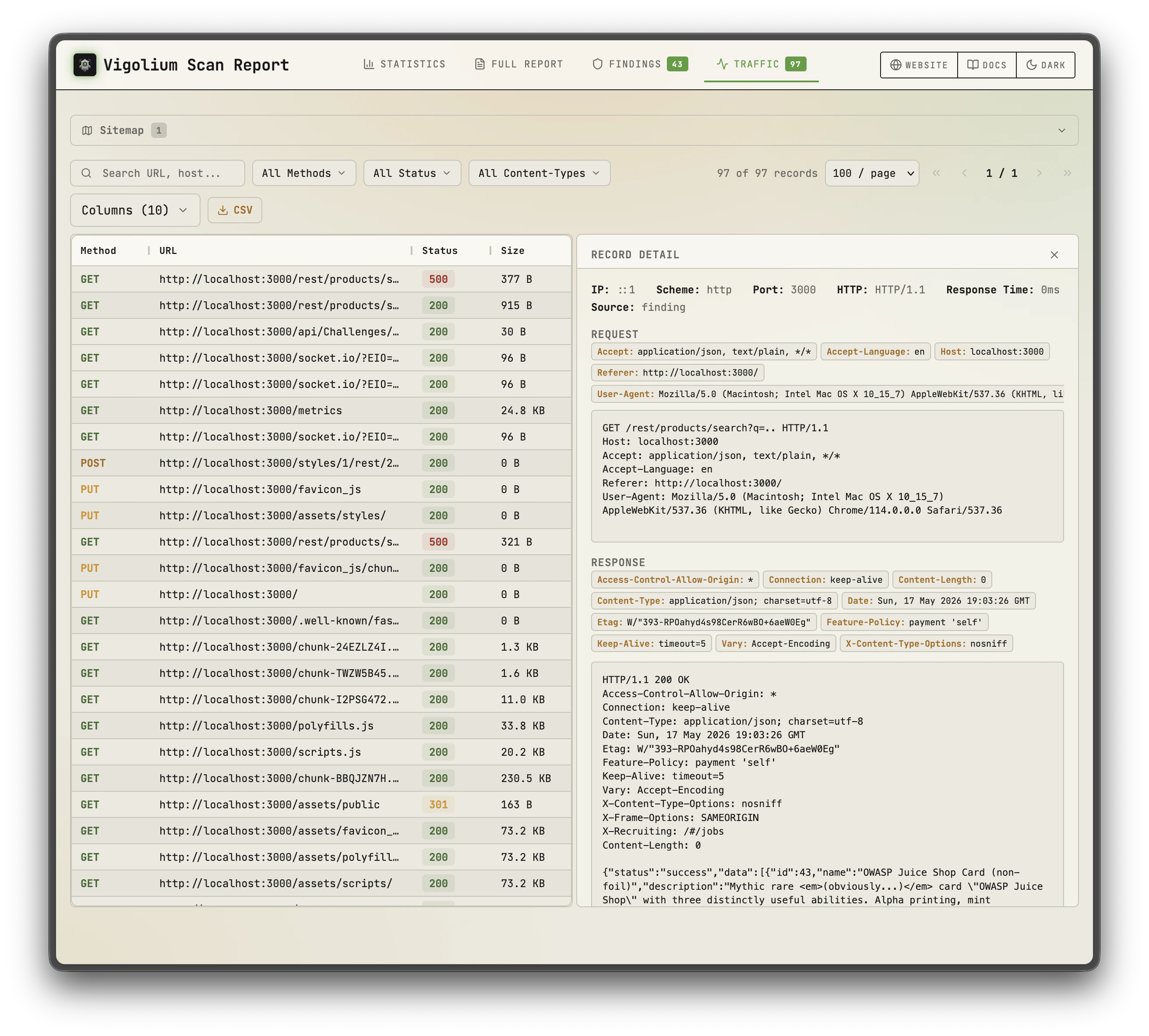
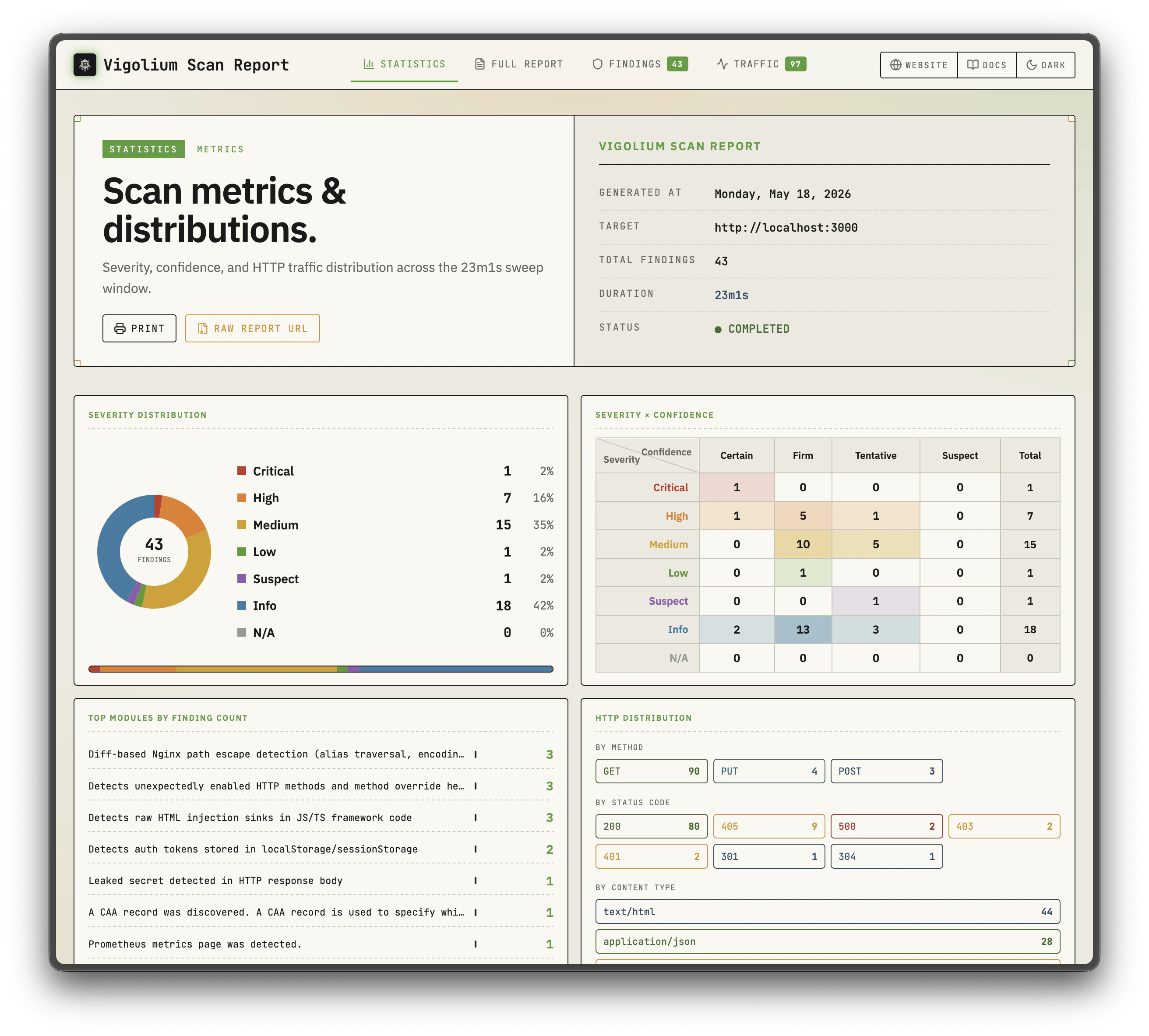
A self-hosted web dashboard that provides a visual interface for managing and analyzing your scan data. Deploy Workbench on your own infrastructure to maintain complete control over your vulnerability data while giving your team an intuitive way to:
* Browse and filter scan findings with severity breakdown per project
* Track vulnerability trends across repositories and scan history
* Manage multiple projects with multi-tenancy support
* View detailed request/response evidence for each finding
Vigolium is a high-fidelity web vulnerability scanner that fuses agentic AI with native speed, modularity, and precision. It combines deterministic multi-phase scanning with AI-driven autonomous analysis to deliver comprehensive security coverage, from injection flaws and access control issues to framework-specific vulnerabilities and blind out-of-band attacks.
The platform is built around three key components that work together to provide a complete vulnerability scanning solution.
## Key Components
The core scanning engine. Handles all scanning logic, module execution, and heavy lifting, from content discovery and browser-based spidering to active fuzzing and agentic AI scanning.
A self-hosted dashboard for visualizing scan results, managing projects, and tracking findings across your infrastructure. Deploy it on your own servers for full control over your data.
A cloud-based solution that provides managed scanning, team collaboration, and centralized reporting without the overhead of self-hosting.
## Scanning Mode
### Agentic Scan
Agentic scanning uses AI agents to drive or augment the scanning process. Invoked via `vigolium agent `. All AI dispatch is routed through the in-process **olium** engine, which supports eleven providers: `openai-codex-oauth`, `anthropic-api-key`, `anthropic-oauth`, `openai-api-key`, `openai-responses`, `anthropic-cli`, `anthropic-claude-sdk-bridge`, `anthropic-compatible`, `anthropic-vertex`, `google-vertex`, and `openai-compatible` (Ollama / OpenRouter / LM Studio / vLLM).
| Mode | Command | Description |
| ------------- | --------------------------------------- | ------------------------------------------------------------------------------------------------------------------------------------------------------------------------------------------------------------------------------------------------------------------------------------------------------------ |
| **Query** | `vigolium agent query` | Single-shot prompt execution. Good for code review, endpoint discovery, secret detection. No network scanning. |
| **Autopilot** | `vigolium agent autopilot` | Autonomous AI-driven pentest. The olium engine discovers endpoints, runs scans, and triages findings on its own, driving bash, file ops, and the vigolium CLI until it calls `halt_scan`. Supports diff-focused runs (`--diff`), `--intensity` preset bundles, and session resume. |
| **Swarm** | `vigolium agent swarm` | AI-guided pipeline for targeted single-request or full-scope (`--discover`) scanning. The master agent selects modules, generates custom JS scanner extensions, runs code audit and SAST, executes scans, and triages results, with native Go handling the heavy lifting while AI intervenes at checkpoints. |
| **Audit** | `vigolium agent audit` | Unified driver dispatcher for whitebox security audits — runs the embedded vigolium-audit harness, the standalone piolium harness, or both side-by-side under one parent scan. Modes: lite / balanced / deep. |
| **Piolium** | `vigolium agent audit --driver=piolium` | Pi-native whitebox audit driver, up to 17 phases at `deep`. Requires the `pi` runtime and the `piolium` extension installed separately. |
| **Olium** | `vigolium olium` / `vigolium ol` | Interactive TUI chat or one-shot non-interactive prompt, the underlying agent runtime. |
All scan-oriented modes support `--source` for source-aware analysis and store session artifacts (plans, extensions, output) under `~/.vigolium/agent-sessions/`. See [Setting Up the Agent](/getting-started/setup-agent) for provider setup.
Agent mode runs with **no sandbox**: the LLM has full shell, file, and network access on the host, and extensions can run arbitrary commands. Run agent mode in a disposable container or VM scoped to your engagement. See the [Security Warning](/others/security-warning) before you start.
### Native Scan
Deterministic, multi-phase vulnerability scanning via `vigolium scan`. Fast, modular, and repeatable, runs content discovery, browser spidering, SPA crawling, and active/passive `dynamic-assessment` phases with **313 scanner modules** (198 active, 115 passive).
| Category | Coverage |
| ------------------------------- | ----------------------------------------------------------------------------------------------------------------------------------------------------------------------------------------------------------------------------------------------------------------------------------------------------- |
| **Injection** | XSS (reflected, DOM-based, SSR hydration), SQL injection (error-based, boolean/time-blind), NoSQL injection, SSTI/CSTI, CRLF injection, command injection, XXE/SAML, prototype pollution |
| **Access Control** | CSRF, IDOR, authorization bypass, mass assignment, forbidden bypass, HTTP method tampering |
| **File & Path** | LFI, path traversal, file upload flaws, directory listing, backup/sensitive file discovery, path normalization bypass |
| **API & Protocol** | GraphQL security suite (introspection, SQLi, IDOR/BOLA, DoS, batching), MCP server security (tool/resource/prompt fuzzing, session & origin checks), SSRF (direct & blind), open redirect, HTTP request smuggling, JWT vulnerabilities, JSONP callback, WebSocket security, race conditions |
| **Framework-Specific** | Spring Boot, Django, Laravel, Rails, Express, Next.js, Nuxt, Remix, ASP.NET/Blazor, IIS, Flask, FastAPI |
| **Enterprise & SaaS Platforms** | Adobe Experience Manager (dispatcher bypass, sensitive servlets, RCE-surface exposure, CVE probes), Salesforce Experience Cloud (Aura object/record exposure, guest Apex execution, Lightning debug mode), ServiceNow (widget & KB data exposure), Microsoft Power Pages (Dataverse Web API exposure) |
| **CMS** | WordPress (XML-RPC, user enum, AJAX exposure), Drupal, Joomla, CMS installer exposure |
| **Cloud & Infra** | Firebase (RTDB, storage, auth, functions), cloud storage listing/takeover, default credentials, web cache poisoning, CORS misconfiguration |
| **Out-of-Band** | Blind vulnerabilities via OAST callbacks (blind SSRF, blind SSTI, OAST probes) |
***
## Vigolium CLI
The CLI is the heart of Vigolium, powering all scanning operations with two complementary modes:
### CLI Highlights
* **Value-aware mutation**: classify parameter values by semantic type and generate intelligent mutations
* **Multi-phase pipeline**: external harvesting, content discovery, SPA crawling, and audit controlled by strategy presets
* **Scanning profiles**: bundle strategy, pace, scope, and module config into a single YAML file
* **Multiple input formats**: URLs, OpenAPI/Swagger, Postman, Burp Suite, cURL, Nuclei JSONL
* **Browser-based spider**: Chromium-driven crawler with SPA support, form filling, and JS analysis
* **Multi-session authentication**: inline sessions, session files, or full auth configs with login flows and token extraction
* **JavaScript extensions**: custom modules and hooks via embedded JS engine
* **Source-aware agentic scan**: pair `--source` with `swarm`, `autopilot`, or `audit` for code-context-aware AI scanning and audit
* **Concurrent architecture**: configurable worker pool with per-host rate limiting and hybrid queue
* **HTML reports**: self-contained HTML reports with sortable/filterable tables
* **API server mode**: REST API with Swagger UI, multi-format ingestion, transparent HTTP proxy
***
## Vigolium Workbench
A self-hosted web dashboard that provides a visual interface for managing and analyzing your scan data. Deploy Workbench on your own infrastructure to maintain complete control over your vulnerability data while giving your team an intuitive way to:
* Browse and filter scan findings with severity breakdown per project
* Track vulnerability trends across repositories and scan history
* Manage multiple projects with multi-tenancy support
* View detailed request/response evidence for each finding


 ***
## Vigolium Cloud Console
A cloud-based solution for teams that want the power of Vigolium without managing infrastructure. Console is the **upgraded, fully-featured version of Vigolium**, managed scanning, centralized reporting, team collaboration, and extra features layered on top of the open-source core, so you can focus on fixing vulnerabilities instead of maintaining tooling.
Check out the Cloud Console at [console.vigolium.com](https://console.vigolium.com/).
***
## Vigolium Cloud Console
A cloud-based solution for teams that want the power of Vigolium without managing infrastructure. Console is the **upgraded, fully-featured version of Vigolium**, managed scanning, centralized reporting, team collaboration, and extra features layered on top of the open-source core, so you can focus on fixing vulnerabilities instead of maintaining tooling.
Check out the Cloud Console at [console.vigolium.com](https://console.vigolium.com/).


 ***
## Where to Go Next
| I want to... | Start here |
| ------------------------------------- | ------------------------------------------------------------------------------- |
| Install the CLI and run my first scan | [Quickstart](/getting-started/quickstart) |
| Pick the right mode for the job | [Choosing a Scan Mode](/getting-started/choosing-a-mode) |
| Run one-shot scans (CI, ad-hoc) | [Native Scan & Stateless Scanning](/getting-started/native-scan) |
| Wire up AI providers | [Setting Up the Agent](/getting-started/setup-agent) |
| Understand how native scanning works | [How It Works](/native-scan/how-it-works) |
| Pick the right scanning strategy | [Strategies](/native-scan/strategies) |
| Dive into individual scan phases | [Phases](/native-scan/phases/discovery), discovery, spidering, audit, extension |
| Try agentic scanning | [Agent Mode](/agentic-scan/agent-mode) |
| Let AI drive scans autonomously | [Autopilot](/agentic-scan/autopilot) |
| Run multi-phase AI + native pipelines | [Swarm](/agentic-scan/swarm) |
| Audit source code in depth | [Agentic Security Audit](/getting-started/agentic-security-audit) |
| Chat with the agent runtime | [Olium](/agentic-scan/olium) |
| Run Vigolium as an API server | [Server Mode](/server-mode/running-the-server) |
| Tweak scan settings | [Configuration](/getting-started/configuration) |
| Export and format results | [Output & Reporting](/getting-started/output-and-reporting) |
| Write custom JS extensions | [Writing Extensions](/customization/writing-extensions) |
| Browse the REST API | [API Overview](/api-overview) |
***
For any inquiries, feel free to contact us at [contact@vigolium.com](mailto:contact@vigolium.com).
***
## Where to Go Next
| I want to... | Start here |
| ------------------------------------- | ------------------------------------------------------------------------------- |
| Install the CLI and run my first scan | [Quickstart](/getting-started/quickstart) |
| Pick the right mode for the job | [Choosing a Scan Mode](/getting-started/choosing-a-mode) |
| Run one-shot scans (CI, ad-hoc) | [Native Scan & Stateless Scanning](/getting-started/native-scan) |
| Wire up AI providers | [Setting Up the Agent](/getting-started/setup-agent) |
| Understand how native scanning works | [How It Works](/native-scan/how-it-works) |
| Pick the right scanning strategy | [Strategies](/native-scan/strategies) |
| Dive into individual scan phases | [Phases](/native-scan/phases/discovery), discovery, spidering, audit, extension |
| Try agentic scanning | [Agent Mode](/agentic-scan/agent-mode) |
| Let AI drive scans autonomously | [Autopilot](/agentic-scan/autopilot) |
| Run multi-phase AI + native pipelines | [Swarm](/agentic-scan/swarm) |
| Audit source code in depth | [Agentic Security Audit](/getting-started/agentic-security-audit) |
| Chat with the agent runtime | [Olium](/agentic-scan/olium) |
| Run Vigolium as an API server | [Server Mode](/server-mode/running-the-server) |
| Tweak scan settings | [Configuration](/getting-started/configuration) |
| Export and format results | [Output & Reporting](/getting-started/output-and-reporting) |
| Write custom JS extensions | [Writing Extensions](/customization/writing-extensions) |
| Browse the REST API | [API Overview](/api-overview) |
***
For any inquiries, feel free to contact us at [contact@vigolium.com](mailto:contact@vigolium.com).