> ## Documentation Index
> Fetch the complete documentation index at: https://docs.vigolium.com/llms.txt
> Use this file to discover all available pages before exploring further.

# Output and Reporting

> Vigolium supports multiple output formats for scan results, discovery data, and spidering output. This guide covers the available formats, result structures, and how to query stored findings.
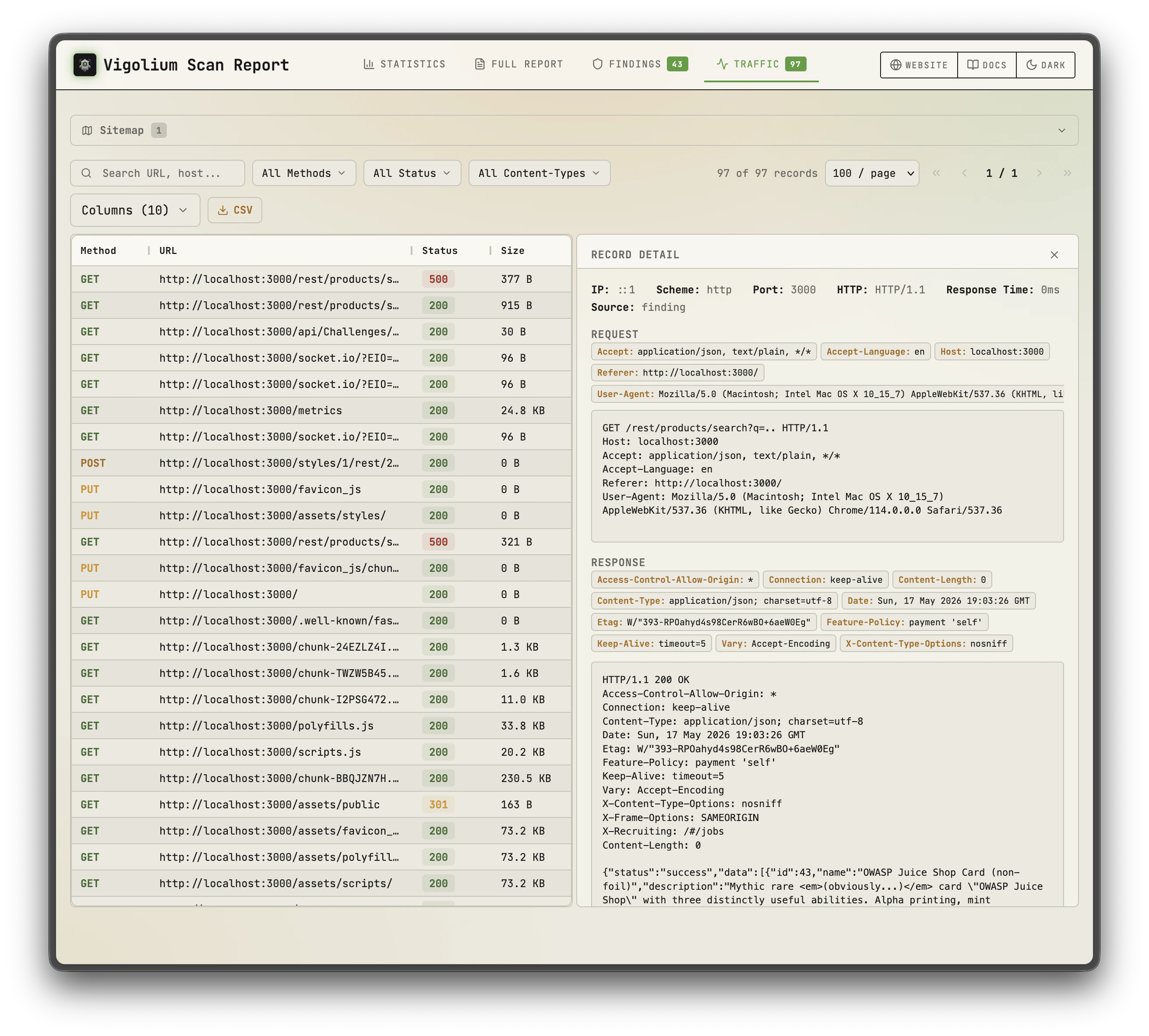
<Columns cols={2}>
  <Frame caption="Project overview with scan summary">
    <img src="https://mintcdn.com/vigolium/bNNIkqR-N7gw4AB_/images/vigolium-static-report-1.png?fit=max&auto=format&n=bNNIkqR-N7gw4AB_&q=85&s=7aba27cdbd14060961c450be78f50b84" alt="Workbench project overview showing scan summary and severity counts" width="2624" height="2366" data-path="images/vigolium-static-report-1.png" />
  </Frame>

  <Frame caption="Findings list with filtering options">
    <img src="https://mintcdn.com/vigolium/bNNIkqR-N7gw4AB_/images/vigolium-static-report-1.png?fit=max&auto=format&n=bNNIkqR-N7gw4AB_&q=85&s=7aba27cdbd14060961c450be78f50b84" alt="Workbench findings list with severity filters and search" width="2624" height="2366" data-path="images/vigolium-static-report-1.png" />
  </Frame>
</Columns>

## Output Formats

The `--format` flag controls the output format. Five formats are available, and they can be combined (e.g. `--format jsonl,html`):

### Console (default)

```bash theme={null}
vigolium scan --target https://example.com
```

Human-readable terminal output with color-coded severity levels. Findings are printed as they are discovered, with a summary table at the end of the scan. This is the default when no `--format` flag is specified.

Severity colors:

* **Critical**: Red
* **High**: Orange/Yellow
* **Medium**: Yellow
* **Low**: Blue
* **Info**: Gray

### JSONL

```bash theme={null}
vigolium scan --target https://example.com --format jsonl
```

One JSON object per line, machine-readable. Each line is a self-contained JSON document representing a single finding or event. This format is well suited for piping to `jq`, ingesting into SIEMs, or processing with custom scripts.

Example usage with `jq`:

```bash theme={null}
vigolium scan --target https://example.com --format jsonl | jq 'select(.severity == "high")'
```

For CI/CD pipelines, `--ci-output-format` is a shorthand that forces clean JSONL with no banners or color codes, drop-in safe for parsing in build scripts:

```bash theme={null}
vigolium scan --stateless -t https://example.com --ci-output-format -o findings
```

See [CI/CD Integration](/guides/ci-cd-integration) for full pipeline examples.

### HTML

```bash theme={null}
vigolium scan --target https://example.com --format html -o report.html
```

Interactive HTML report using an embedded ag-grid table. The report is a self-contained HTML file with sorting, filtering, and search capabilities. The `-o/--output` flag is required when using HTML format.

HTML format is supported for:

* Scan results (findings)
* Discovery phase output (discovered URLs and endpoints)
* Spidering phase output (crawled pages)

### SQLite

```bash theme={null}
vigolium scan --stateless --target https://example.com --format sqlite -o scan
```

Dumps the run's standalone database to `<output>.sqlite` (via SQLite `VACUUM INTO`), producing a single self-contained file you can reopen later with `vigolium finding`/`traffic` (see [Reading a Standalone Export](#reading-a-standalone-export)). Aliases: `sqlite3`, `db`.

* Requires `-S/--stateless` and `-o/--output`. Stateless runs use a per-run temporary database, so "this scan's SQLite" is well-defined; a persisted run writes into the shared project DB, where it would be ambiguous (use `vigolium export` for that).
* Combines with other formats: `--format sqlite,html -o scan` writes both `scan.sqlite` and `scan.html`.
* Under `--split-by-host`, each per-host file is named `<base>-<host>.sqlite`.

### Filesystem (fs)

```bash theme={null}
vigolium scan --target https://example.com --format fs -o run
```

Writes a flat, browsable filesystem tree instead of a single file — so you (or a coding agent) can investigate a scan with plain `ls`/`grep`/`jq`, no database required. Two sibling directories are written off the `-o` base (defaulting to `vigolium` in the current directory when `-o` is omitted), so `-o run` yields `run-traffic/` and `run-findings/`:

```
run-traffic/
  index.json                 # [{id,host,path,method,url,status,content_type,bytes,finding}, …]
  <host>/0001.req            # "@target https://<host>" line + the raw request (replayable)
  <host>/0001.resp.headers   # status line + response headers
  <host>/0001.resp.body      # response body, gzip-decoded so it greps clean
run-findings/
  index.json                 # [{id,host,path,severity,confidence,module,title,url,traffic}, …]
  <host>/0001.md             # the finding, cross-linked to ../../run-traffic/<host>/0001.req
```

* Per-host ids are zero-padded and assigned in `sent_at` order, so re-exports are reproducible.
* Each `<id>.req` starts with an `@target <scheme>://<authority>` line followed by the raw request verbatim — strip line 1 and it replays directly.
* `index.json` is the entry point: one `jq` over it maps every id to its url/status and to the file holding the bytes. On a traffic row, the `finding` field carries the top severity of any finding touching that request; each finding `.md` links straight to the `.req`/`.resp.*` that proves it.
* Available on `vigolium export`, `vigolium db export` (honoring its filters), and `scan`/`scan-url`/`scan-request`/`run` — with or without `-S/--stateless`.
* Honors `--omit-response` (drops the `.resp.*` files). `--split-by-host` is a no-op, since `fs` already splits by host.

<Callout icon="circle-info" color="#3B82F6" iconType="regular">
  The ingestion server can produce this same tree **live** with `vigolium server --mirror-fs <dir>` — see [Running the Server](/server-mode/running-the-server#live-filesystem-mirror).
</Callout>

## Severity Scale

Findings are classified using five severity levels:

| Severity     | Description                                                                                      |
| ------------ | ------------------------------------------------------------------------------------------------ |
| **Critical** | Exploitable vulnerabilities with severe impact (e.g., RCE, SQL injection with data exfiltration) |
| **High**     | Significant vulnerabilities that can lead to data compromise or unauthorized access              |
| **Medium**   | Vulnerabilities that require specific conditions to exploit or have limited impact               |
| **Low**      | Minor issues with minimal security impact                                                        |
| **Info**     | Informational findings, such as technology fingerprints or configuration details                 |

## Confidence Scale

Each finding includes a confidence level indicating the reliability of the detection:

| Confidence    | Description                                                                                                                                        |
| ------------- | -------------------------------------------------------------------------------------------------------------------------------------------------- |
| **Certain**   | Confirmed with proof. The scanner has verified the vulnerability through direct evidence (e.g., a reflected payload executed, data was extracted). |
| **Firm**      | Strong evidence supports the finding. Multiple indicators confirm the issue, but direct proof of exploitation was not obtained.                    |
| **Tentative** | Based on heuristic or pattern matching. The finding may be a false positive and should be manually verified.                                       |

## Finding Structure

Each finding contains the following fields:

| Field           | Description                                                                              |
| --------------- | ---------------------------------------------------------------------------------------- |
| **Module**      | The scanner module that produced the finding (e.g., `xss-reflected`, `sqli-error-based`) |
| **Severity**    | Critical, High, Medium, Low, or Info                                                     |
| **Confidence**  | Certain, Firm, or Tentative                                                              |
| **URL**         | The target URL where the vulnerability was detected                                      |
| **Parameter**   | The specific parameter or insertion point that was tested (if applicable)                |
| **Evidence**    | Proof of the vulnerability, response excerpts, payloads, or other confirming data        |
| **Description** | Human-readable explanation of the vulnerability and its potential impact                 |

## Saving Output

### Using the -o/--output Flag

Write output directly to a file:

```bash theme={null}
# Save JSONL output
vigolium scan --target https://example.com --format jsonl -o results.jsonl

# Save HTML report
vigolium scan --target https://example.com --format html -o report.html

# Save console output
vigolium scan --target https://example.com -o results.txt
```

### Piping JSONL

JSONL output can be piped to other tools for processing:

```bash theme={null}
# Filter high and critical findings
vigolium scan --target https://example.com --format jsonl | jq 'select(.severity == "high" or .severity == "critical")'

# Count findings by severity
vigolium scan --target https://example.com --format jsonl | jq -s 'group_by(.severity) | map({severity: .[0].severity, count: length})'

# Extract just URLs with findings
vigolium scan --target https://example.com --format jsonl | jq -r '.url'
```

## Discovery and Spidering Output

The discovery and spidering phases produce their own output alongside scan findings.

### Discovery Output

Discovery output includes URLs and endpoints found through wordlist-based content discovery, Wayback Machine data, and JavaScript analysis. Each discovered URL is reported with its HTTP status code and response metadata.

```bash theme={null}
# Run only discovery and save results
vigolium scan --target https://example.com --only discovery --format html -o discovery-report.html
```

### Spidering Output

Spidering output includes pages found by the browser-based crawler, along with forms, links, and dynamic content discovered during crawling.

```bash theme={null}
# Run only spidering and save results
vigolium scan --target https://example.com --only spidering --format html -o spider-report.html
```

Both phases support all three output formats (console, JSONL, HTML).

## OAST Interactions

Out-of-band Application Security Testing (OAST) findings come from DNS and HTTP callback interactions. When a scanner payload triggers an out-of-band request to the OAST server, the interaction is correlated back to the original test case.

OAST findings appear in output with:

* The original request that triggered the out-of-band interaction
* The type of interaction (DNS lookup, HTTP request)
* Timing information (when the callback was received)
* Correlation data linking the interaction to the specific payload

OAST interactions may arrive after the initial scan phase completes, as some out-of-band triggers have delayed execution. Vigolium waits for a configurable period after scanning to collect late-arriving callbacks.

If outbound DNS or HTTP is blocked by a firewall, OAST-based detections will not work. The scanner will still produce findings through other detection methods, OAST simply adds an additional layer of out-of-band detection.

## Querying Results from Database

All scan data is stored in the database (SQLite by default). You can query stored results using CLI commands without re-running scans.

### Listing Findings

```bash theme={null}
# List all findings
vigolium finding list

# List findings for a specific project
vigolium finding list --project my-project

# Filter by minimum severity and by confidence (adds a colorized CONFIDENCE column)
vigolium finding list --min-severity high
vigolium finding list --confidence firm
vigolium finding list --confidence certain,firm
```

`--confidence` keeps only findings whose confidence matches one of the comma-separated levels (`certain`, `firm`, `tentative`) and renders a colorized CONFIDENCE column, complementing `--min-severity`.

### Listing Traffic

```bash theme={null}
# List recorded HTTP traffic
vigolium traffic list

# List traffic for a specific project
vigolium traffic list --project my-project
```

Results are scoped to the active project. Use `--project-name`/`--project-uuid` to target a specific project, or set a default for your shell with `eval $(vigolium project use <uuid>)`. See the [Projects & Multi-Tenancy](/others/projects) reference for details on multi-tenancy and project scoping.

### Reading a Standalone Export

`finding` and `traffic` can read a file directly instead of your project database, which is handy for inspecting a `--format jsonl` export or a foreign `.sqlite` file from another machine. Pass `-S/--stateless` together with `--db <file>`:

```bash theme={null}
# Browse a scan's JSONL export with all the normal filters and sorting
vigolium finding -S --db ./scan.jsonl --min-severity medium
vigolium traffic -S --db ./scan.jsonl --status 500 -n 20

# A standalone .sqlite (e.g. from --format sqlite) works too
vigolium finding -S --db ./scan.sqlite --json --with-records
```

`-S/--stateless` turns project scoping **off**, so every row in the file is shown regardless of the `project_uuid` it carries. Nothing is written to your project database (a JSONL source is loaded into a throwaway in-memory SQLite). The source type is auto-detected by extension, falling back to a header sniff (`.jsonl`/`.ndjson` vs the `SQLite format 3` magic / `.sqlite`/`.sqlite3`/`.db`).

### Rendering a Finding or Record as Markdown

`--markdown` prints the selected findings/records as Markdown — evidence plus request/response in fenced `http` blocks — to stdout. Pipe it to a file or a viewer like `glow`, and pair it with `--id`, a fuzzy search term, or `-n 1` to focus a single item:

```bash theme={null}
vigolium finding xss --markdown > findings.md
vigolium finding -S --db ./scan.jsonl --id 42 --markdown
vigolium traffic -S --db ./scan.jsonl search-term -n 1 --markdown
```

Under `-S/--stateless`, add `--compact` to window the response around the finding's match (`matched_at` / `extracted_results`) — or cap a record's body to a preview — so a long page doesn't flood the console. Without `--compact`, bodies render in full.
