> ## Documentation Index
> Fetch the complete documentation index at: https://docs.vigolium.com/llms.txt
> Use this file to discover all available pages before exploring further.
# Using Vigolium with Burp Suite
> Install the Vigolium Burp Suite extension, forward proxy traffic into a running Vigolium server, launch native and agentic scans from Burp, and use the bidirectional live bridge to sync traffic in both directions.
The **Vigolium Burp Suite extension** turns Burp into a front-end for your Vigolium server. As you browse, requests and responses are forwarded to Vigolium, native and agentic scans are launched straight from Burp's context menus, and findings stream back into both Burp and the [Web UI](/getting-started/web-ui) because everything is stored in the same Vigolium database.
The extension does **not** run the scanner inside Burp's JVM. It forwards traffic to the Vigolium server and polls it for findings, so scans use your Vigolium server resources and keep running even after Burp is closed.
Using **Caido** instead? The [Vigolium Caido plugin](/getting-started/caido-plugin) offers the same workflows — dispatch, proxy forwarding, sitemap snapshots, and the live bridge — over the same bridge protocol, with `--caido-bridge-url` as an alias for `--burp-bridge-url`.
 ## Download the extension
The extension is distributed as a pre-built JAR from the dedicated repository:
Grab the latest **`burp-vigolium.jar`** and browse the source at
[github.com/vigolium/burp-vigolium](https://github.com/vigolium/burp-vigolium).
Download [`burp-vigolium.jar`](https://github.com/vigolium/burp-vigolium/blob/main/burp-vigolium.jar) directly, or build it from source:
```bash theme={null}
git clone https://github.com/vigolium/burp-vigolium
cd burp-vigolium
./gradlew spotlessCheck test shadowJar # → build/libs/burp-vigolium.jar
```
The bidirectional live bridge and Target Site map snapshots require **`burp-vigolium` v0.2.0 or later**. Earlier builds can still forward per-request traffic and launch scans, but do not expose the loopback bridge listener. The installed version is shown in the upper-right corner of the **Settings** view.
## Install and connect
The extension needs a running server to talk to. Start one (add `--mirror-fs ` to also write traffic to disk):
```bash theme={null}
# With API authentication (recommended)
export VIGOLIUM_API_KEY=my-secret-key
vigolium server
# Or, local development only — no auth
vigolium server -A
```
Retrieve the API key to paste into the extension:
```bash theme={null}
vigolium config ls server.auth_api_key --force
```
In Burp, go to **Extensions → Installed → Add**. Set **Extension type: Java**, choose the downloaded `burp-vigolium.jar`, and click **Next**. A **Vigolium** tab appears.
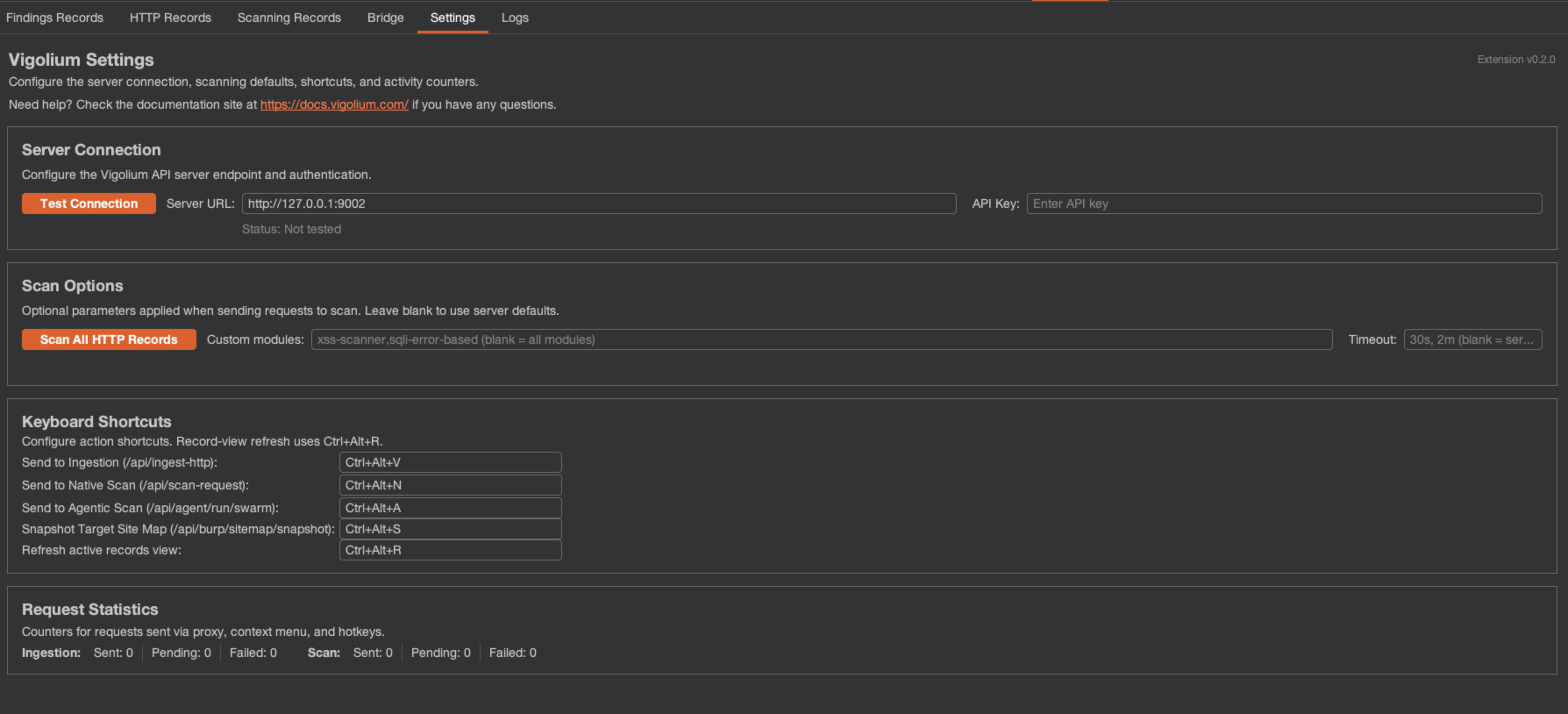
Open **Vigolium → Settings**, enter the **Server URL** (default `http://127.0.0.1:9002`) and **API Key** on the Server Connection row, then click **Test Connection** to confirm the server is reachable.
Use a Burp context-menu action or a keyboard shortcut to dispatch traffic. Findings stream into the **Findings Records** tab and the Web UI as they are produced.
The installed extension version is shown in the upper-right corner of the **Settings** view. Release builds read it from the JAR manifest; local IDE runs display `development`.
## Three dispatch workflows
Right-click a request in **Proxy History**, **Target Site map**, **Repeater**, or any supported Burp request view — the actions are available directly, without opening a nested menu:
| Action | Default shortcut | What it does |
| -------------------------------- | ---------------- | ----------------------------------------------------------------------- |
| **Send to Vigolium** (ingestion) | `Ctrl+Alt+V` | Stores the selected request/response in Vigolium via `/api/ingest-http` |
| **Send to Native Scan** | `Ctrl+Alt+N` | Starts a deterministic module-based scan of the selected request |
| **Send to Agentic Scan** | `Ctrl+Alt+A` | Starts an AI-guided (swarm) scan of the selected request |
Vigolium preserves headers, cookies, body fields, query parameters, and path segments as scanner input, so a request sent from Repeater is scanned exactly as you shaped it.
## Forward proxy traffic automatically
Instead of dispatching requests one at a time, enable **Proxy Mode** to forward everything flowing through Burp Proxy into Vigolium. Combine it with **In-scope only** so static assets and out-of-scope hosts don't pollute the database, and use the **Proxy Filter Rules** to allow or deny by file extension, HTTP method, or host.
Pair Proxy Mode with a passive-only server (`vigolium server -S --passive-only`) to continuously analyze browsed traffic — secrets, security headers, cookie flags, disclosure — without sending any active requests. See [Server & Ingestion](/getting-started/server-and-ingestion).
## What you get inside Burp
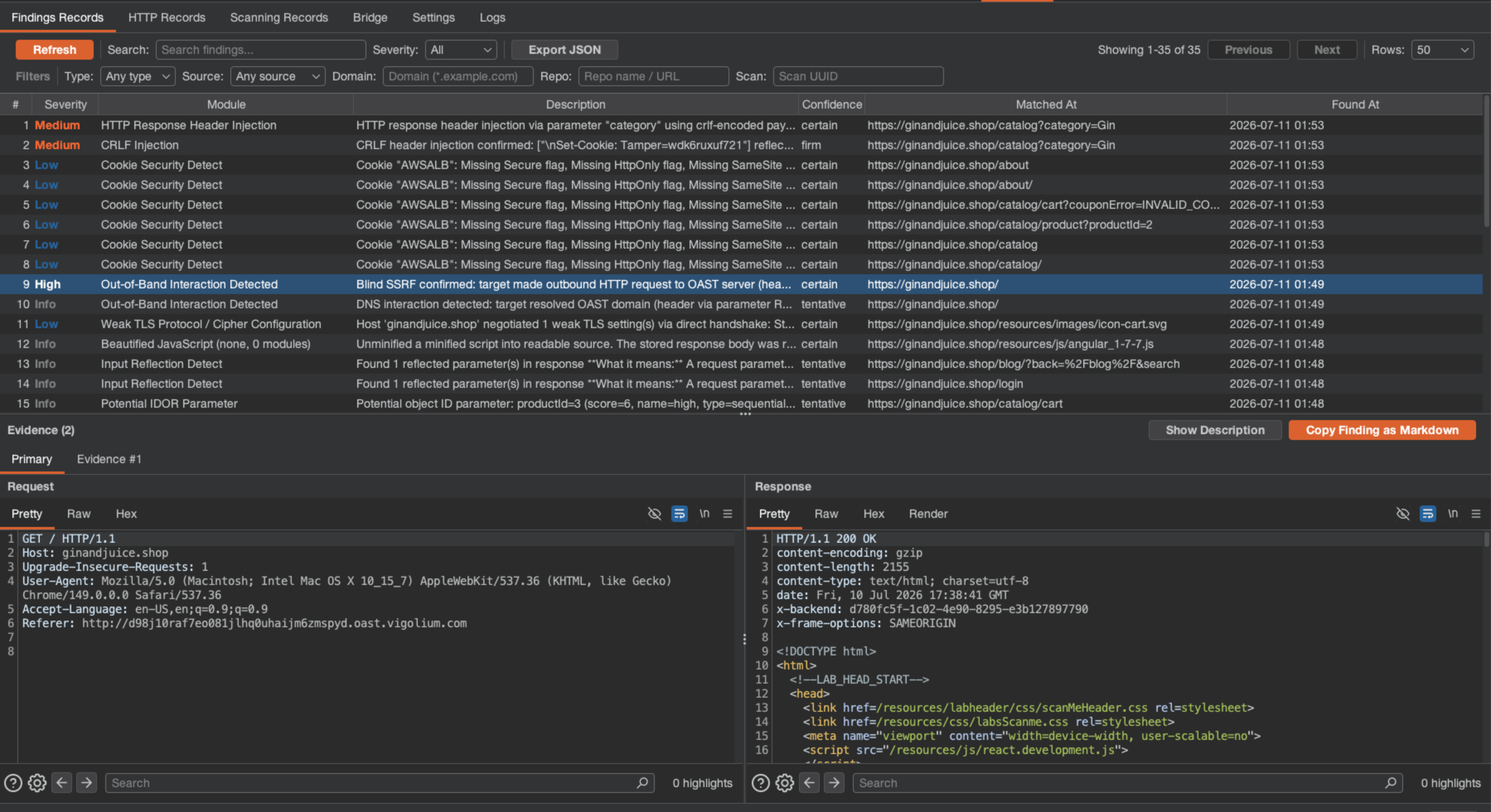
The **Vigolium** panel is organized into six tabs:
| Tab | Purpose |
| -------------------- | --------------------------------------------------------------------------------------------------------------------------------------------------- |
| **Findings Records** | Searchable, sortable findings with per-finding evidence tabs, request/response editors, an expandable description, and **Copy Finding as Markdown** |
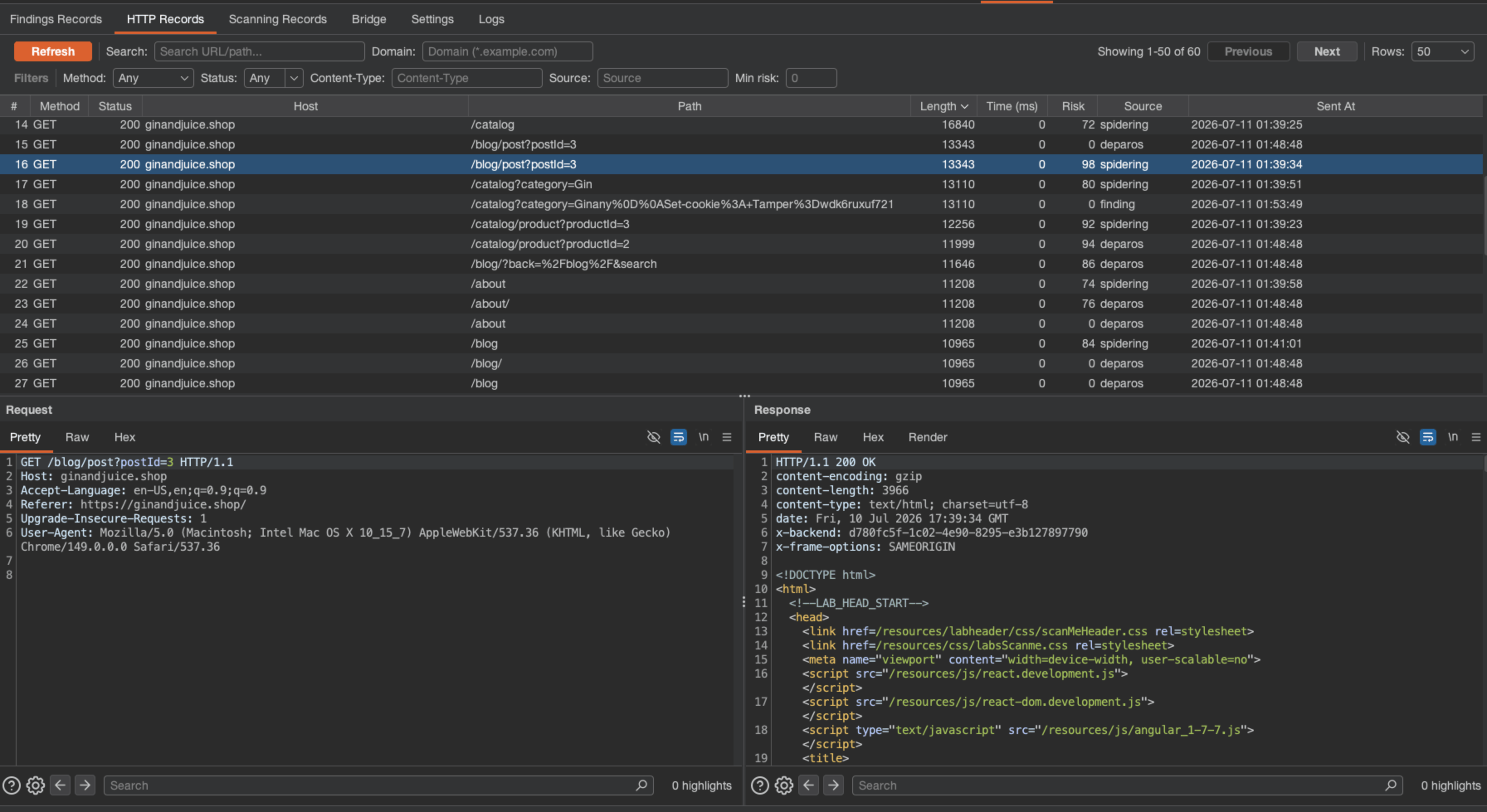
| **HTTP Records** | Filterable, sortable request/response records synchronized with Vigolium |
| **Scanning Records** | Native and agentic scan history with pagination, auto-refresh, and scan logs |
| **Bridge** | Target Site map snapshots, the live loopback listener, Proxy forwarding, and filter rules |
| **Settings** | Extension version, server connection, scan options, request statistics, and configurable hotkeys |
| **Logs** | Timestamped activity log (INFO / WARN / ERROR) |
## Download the extension
The extension is distributed as a pre-built JAR from the dedicated repository:
Grab the latest **`burp-vigolium.jar`** and browse the source at
[github.com/vigolium/burp-vigolium](https://github.com/vigolium/burp-vigolium).
Download [`burp-vigolium.jar`](https://github.com/vigolium/burp-vigolium/blob/main/burp-vigolium.jar) directly, or build it from source:
```bash theme={null}
git clone https://github.com/vigolium/burp-vigolium
cd burp-vigolium
./gradlew spotlessCheck test shadowJar # → build/libs/burp-vigolium.jar
```
The bidirectional live bridge and Target Site map snapshots require **`burp-vigolium` v0.2.0 or later**. Earlier builds can still forward per-request traffic and launch scans, but do not expose the loopback bridge listener. The installed version is shown in the upper-right corner of the **Settings** view.
## Install and connect
The extension needs a running server to talk to. Start one (add `--mirror-fs ` to also write traffic to disk):
```bash theme={null}
# With API authentication (recommended)
export VIGOLIUM_API_KEY=my-secret-key
vigolium server
# Or, local development only — no auth
vigolium server -A
```
Retrieve the API key to paste into the extension:
```bash theme={null}
vigolium config ls server.auth_api_key --force
```
In Burp, go to **Extensions → Installed → Add**. Set **Extension type: Java**, choose the downloaded `burp-vigolium.jar`, and click **Next**. A **Vigolium** tab appears.
Open **Vigolium → Settings**, enter the **Server URL** (default `http://127.0.0.1:9002`) and **API Key** on the Server Connection row, then click **Test Connection** to confirm the server is reachable.
Use a Burp context-menu action or a keyboard shortcut to dispatch traffic. Findings stream into the **Findings Records** tab and the Web UI as they are produced.
The installed extension version is shown in the upper-right corner of the **Settings** view. Release builds read it from the JAR manifest; local IDE runs display `development`.
## Three dispatch workflows
Right-click a request in **Proxy History**, **Target Site map**, **Repeater**, or any supported Burp request view — the actions are available directly, without opening a nested menu:
| Action | Default shortcut | What it does |
| -------------------------------- | ---------------- | ----------------------------------------------------------------------- |
| **Send to Vigolium** (ingestion) | `Ctrl+Alt+V` | Stores the selected request/response in Vigolium via `/api/ingest-http` |
| **Send to Native Scan** | `Ctrl+Alt+N` | Starts a deterministic module-based scan of the selected request |
| **Send to Agentic Scan** | `Ctrl+Alt+A` | Starts an AI-guided (swarm) scan of the selected request |
Vigolium preserves headers, cookies, body fields, query parameters, and path segments as scanner input, so a request sent from Repeater is scanned exactly as you shaped it.
## Forward proxy traffic automatically
Instead of dispatching requests one at a time, enable **Proxy Mode** to forward everything flowing through Burp Proxy into Vigolium. Combine it with **In-scope only** so static assets and out-of-scope hosts don't pollute the database, and use the **Proxy Filter Rules** to allow or deny by file extension, HTTP method, or host.
Pair Proxy Mode with a passive-only server (`vigolium server -S --passive-only`) to continuously analyze browsed traffic — secrets, security headers, cookie flags, disclosure — without sending any active requests. See [Server & Ingestion](/getting-started/server-and-ingestion).
## What you get inside Burp
The **Vigolium** panel is organized into six tabs:
| Tab | Purpose |
| -------------------- | --------------------------------------------------------------------------------------------------------------------------------------------------- |
| **Findings Records** | Searchable, sortable findings with per-finding evidence tabs, request/response editors, an expandable description, and **Copy Finding as Markdown** |
| **HTTP Records** | Filterable, sortable request/response records synchronized with Vigolium |
| **Scanning Records** | Native and agentic scan history with pagination, auto-refresh, and scan logs |
| **Bridge** | Target Site map snapshots, the live loopback listener, Proxy forwarding, and filter rules |
| **Settings** | Extension version, server connection, scan options, request statistics, and configurable hotkeys |
| **Logs** | Timestamped activity log (INFO / WARN / ERROR) |
 Selecting a finding opens its primary request and response in Burp's message editors; additional evidence appears as adjacent tabs so you can compare without a drop-down. The orange **Copy Finding as Markdown** action copies the full finding — metadata, description, matched URLs, requests, responses, and extra evidence — ready to paste into a report or a coding agent.
 ### Keyboard shortcuts
Every action is rebindable under **Settings → Keyboard Shortcuts**. The defaults:
| Action | Default shortcut |
| -------------------------- | ---------------- |
| Send to ingestion | `Ctrl+Alt+V` |
| Send to native scan | `Ctrl+Alt+N` |
| Send to agentic scan | `Ctrl+Alt+A` |
| Snapshot Target Site map | `Ctrl+Alt+S` |
| Refresh active record view | `Ctrl+Alt+R` |
`Ctrl+Alt+R` is contextual — while focus is inside Findings Records, HTTP Records, Native Scans, or Agentic Scans, it activates that view's Refresh button.
## Target Site map snapshots
Beyond per-request dispatch, the extension can upload your whole **Target Site map** to Vigolium in one shot. Open **Vigolium → Bridge → Target Site Map Snapshot** and either run a snapshot immediately (`Ctrl+Alt+S`) or enable periodic snapshots (disabled by default; five-minute interval when on). Use **In-scope only** to exclude out-of-scope traffic.
Snapshots are **incremental** within the current Burp session and **idempotent** on the server: requests and available responses upload in bounded chunks, and unchanged records are never duplicated.
## Bidirectional live bridge
The **live bridge** connects Vigolium's CLI and server to Burp in *both* directions over an opt-in, loopback-only listener — query live Burp Proxy history from Vigolium, or copy Vigolium traffic back into Burp's Target Site map.
The same protocol backs the [Caido plugin](/getting-started/caido-plugin), so `--burp-bridge-url` and its `--caido-bridge-url` alias are one flag. Which vendor is listening is **discovered, not declared**: each reply carries an `implementation` identity that Vigolium maps onto the record's `source` label (`burp` or `caido`), and the merged `/api/http-records` response names it in `X-Vigolium-Bridge-Source`. A listener too old to report one is read as `burp`.
### Keyboard shortcuts
Every action is rebindable under **Settings → Keyboard Shortcuts**. The defaults:
| Action | Default shortcut |
| -------------------------- | ---------------- |
| Send to ingestion | `Ctrl+Alt+V` |
| Send to native scan | `Ctrl+Alt+N` |
| Send to agentic scan | `Ctrl+Alt+A` |
| Snapshot Target Site map | `Ctrl+Alt+S` |
| Refresh active record view | `Ctrl+Alt+R` |
`Ctrl+Alt+R` is contextual — while focus is inside Findings Records, HTTP Records, Native Scans, or Agentic Scans, it activates that view's Refresh button.
## Target Site map snapshots
Beyond per-request dispatch, the extension can upload your whole **Target Site map** to Vigolium in one shot. Open **Vigolium → Bridge → Target Site Map Snapshot** and either run a snapshot immediately (`Ctrl+Alt+S`) or enable periodic snapshots (disabled by default; five-minute interval when on). Use **In-scope only** to exclude out-of-scope traffic.
Snapshots are **incremental** within the current Burp session and **idempotent** on the server: requests and available responses upload in bounded chunks, and unchanged records are never duplicated.
## Bidirectional live bridge
The **live bridge** connects Vigolium's CLI and server to Burp in *both* directions over an opt-in, loopback-only listener — query live Burp Proxy history from Vigolium, or copy Vigolium traffic back into Burp's Target Site map.
The same protocol backs the [Caido plugin](/getting-started/caido-plugin), so `--burp-bridge-url` and its `--caido-bridge-url` alias are one flag. Which vendor is listening is **discovered, not declared**: each reply carries an `implementation` identity that Vigolium maps onto the record's `source` label (`burp` or `caido`), and the merged `/api/http-records` response names it in `X-Vigolium-Bridge-Source`. A listener too old to report one is read as `burp`.
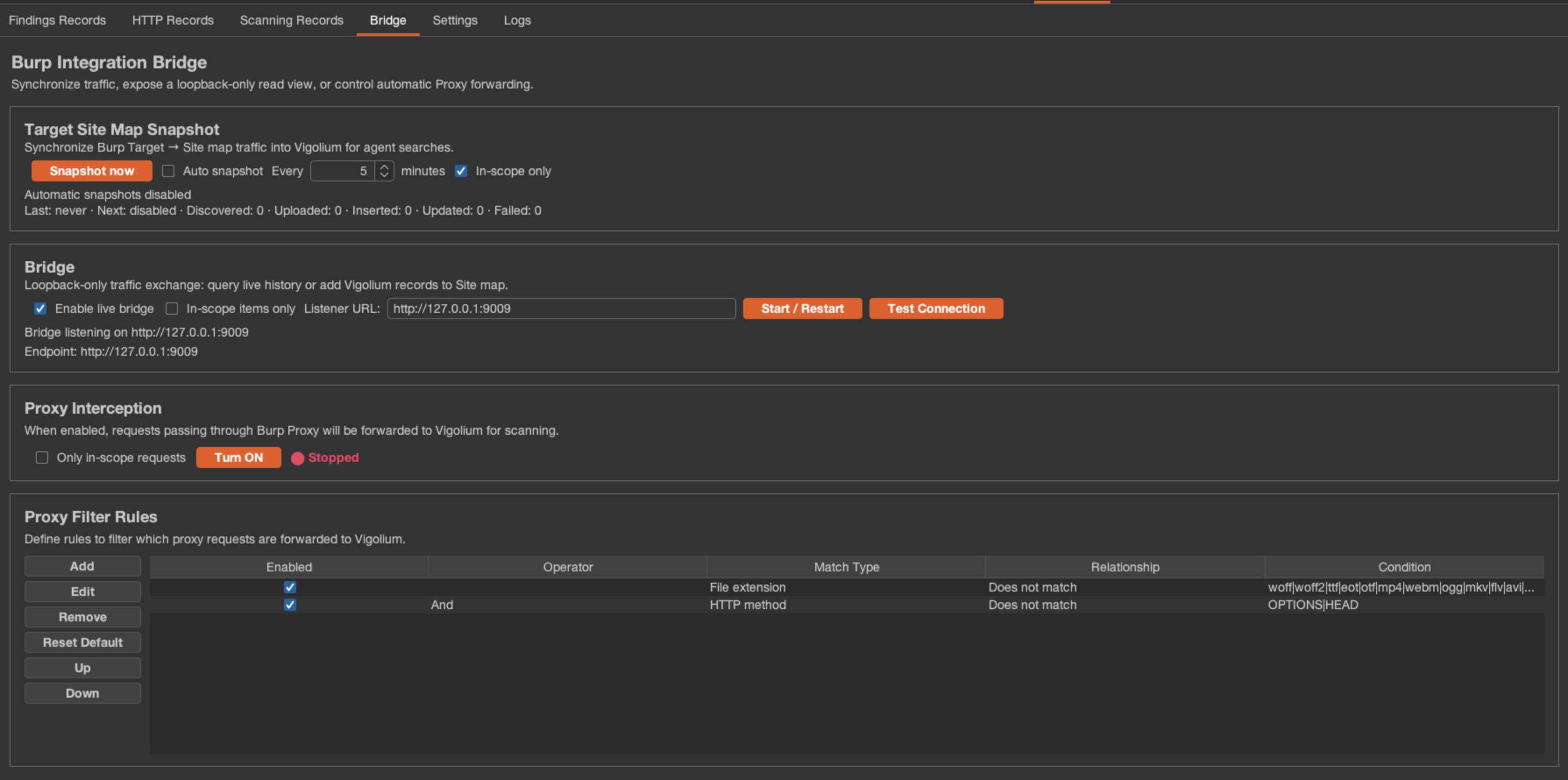 Open **Vigolium → Bridge**, select **Enable live bridge**, and set the listener URL (default `http://127.0.0.1:9009`). The extension starts an embedded HTTP server on that loopback address; it refuses non-loopback binds. Optionally enable **In-scope items only** to keep bridge searches within Burp's Target scope.
Pass the listener URL to any bridge-aware command with the `--burp-bridge-url` flag — this is the recommended way, since each command stays explicit and self-contained:
```bash theme={null}
vigolium traffic --burp-bridge-url http://127.0.0.1:9009
```
Only when you'd rather not repeat the flag across many commands in the same shell, export the env var once instead:
```bash theme={null}
export VIGOLIUM_BURP_BRIDGE_URL="http://127.0.0.1:9009" # optional fallback — the --burp-bridge-url flag overrides it
```
Every command below takes `--burp-bridge-url http://127.0.0.1:9009`; if you exported `VIGOLIUM_BURP_BRIDGE_URL`, drop the flag.
### Read live Burp history
Merge Burp's Proxy history into a Vigolium traffic view without persisting anything. Live rows are labelled `source: burp`, and the usual filters, sorting, pagination, and JSON output all apply:
```bash theme={null}
# Browse Burp's live history alongside your database records
vigolium traffic --burp-bridge-url http://127.0.0.1:9009
# Only the live Burp portion of the merged view
vigolium traffic --burp-bridge-url http://127.0.0.1:9009 --source burp
```
Point a running server at the listener to do the same for the API and Web UI — `GET /api/http-records` then returns Burp's live rows merged with stored ones:
```bash theme={null}
vigolium server --burp-bridge-url http://127.0.0.1:9009
```
### Persist Burp traffic into the database
Two ways in, depending on how much you want:
```bash theme={null}
# The traffic your active filters selected (add --all for every match, not just this page)
vigolium traffic --burp-bridge-url http://127.0.0.1:9009 --save-to-vigolium-db
# One-shot bulk import of the Proxy history for one host
vigolium import --burp-bridge-url http://127.0.0.1:9009 --host acme.test
```
**Name what you want — an unfiltered `import -B` is refused (exit 2) since v0.4.5.** Your Proxy history is everything you have browsed this session, and importing it wholesale drags every unrelated host you visited — with its cookies and tokens — into the database. Where that database is shared with a coding agent, that is a cross-engagement leak.
Use the same filters `traffic -B` takes: `--host` (wildcards), `--path`, `--method`, `--status`, `--search`, `--exclude-search`, `--from`/`--to`, `-n`. When you genuinely do want everything, say so with `--all-hosts` (add `--yes` to skip the pre-flight count confirmation).
```bash theme={null}
vigolium import -B http://127.0.0.1:9009 --host '*.acme.test' --method POST
vigolium import -B http://127.0.0.1:9009 --all-hosts --yes
```
Bridge imports are **idempotent**: new requests are inserted, changed responses refresh the existing row, and unchanged traffic is skipped. Because the bridge is an import source in its own right, `--burp-bridge-url` can't be combined with a path argument or `--glob-db` in the same `import` invocation.
`traffic -B --save-to-vigolium-db` no longer silently truncates the write at 100 records. An untyped `-n` is a *listing* default and must not bound an import, so the import runs unlimited; a typed `-n` is honored as an explicit budget and warns when the cap actually bit.
### Push Vigolium traffic back into Burp
The reverse direction — copy stored records into Burp's **Target Site map** so you can work them by hand:
```bash theme={null}
# Copy the DB traffic your filters selected into Burp's Site map
vigolium traffic --burp-bridge-url http://127.0.0.1:9009 --save-to-burp
# Send a replayed request + its fresh response straight into the Site map
vigolium replay --record-uuid --burp-bridge-url http://127.0.0.1:9009 --save-to-burp
```
`--save-to-burp` and `--save-to-vigolium-db` are mutually exclusive — pick a direction per command.
### Seed an agentic scan from Burp
Autopilot can pull live history across the bridge **before** it builds its prior-context brief and runs the pre-scan, so the agent starts from the traffic you already browsed instead of rediscovering it:
```bash theme={null}
vigolium agent autopilot -t https://example.com \
--burp-bridge-url http://127.0.0.1:9009
```
The bridge listener is **disabled by default** and requires no credentials because it only binds to a validated loopback address, rejects unexpected `Host`/`Origin` headers, and uses temporary result references that expire when the listener restarts or the extension unloads. Disabling the setting or unloading the extension stops the listener immediately.
## Send traffic through Burp's engine
The read/write bridge above moves stored traffic between the two tools. The **send bridge** goes one step further: it lets `replay`, `fuzz`, and `finding` issue a request through **Burp's own HTTP stack** — so the exact bytes you assembled hit the wire (a hand-crafted `Content-Length`, a smuggling prefix, an unusual method) instead of being normalised by Go's client — and stage the exchange into **Repeater** or **Organizer** for manual follow-up.
All of these flags require `--burp-bridge-url` (the same loopback listener as above; env fallback `VIGOLIUM_BURP_BRIDGE_URL`). They are **opt-in** — without them, each command's send path is byte-for-byte unchanged. The listener is preflighted once up front, so an unavailable bridge is a single clear error rather than one failure per request.
Requires a **`burp-vigolium`** build that exposes the `/api/burp-bridge/{send,repeater,organizer}` endpoints (the installed version is shown in the extension's **Settings** view). If a target is out of scope and Burp is set to "in-scope only", the send returns a clean error instead of silently dropping.
### Send exact bytes with `--send-via-burp`
Go's HTTP client normalises what you hand it: it recomputes `Content-Length`, re-frames the request, and rejects some malformed constructions outright. That's fine for ordinary traffic and fatal for the attacks that depend on the malformation. `--send-via-burp` hands the raw bytes to Burp's stack instead, so what you assembled is what reaches the wire:
```bash theme={null}
# Replay a stored record through Burp's engine
vigolium replay --record-uuid abc12345 \
--burp-bridge-url http://127.0.0.1:9009 --send-via-burp
# Send a hand-crafted raw request byte-for-byte
vigolium replay --raw-request-file exact.txt \
--burp-bridge-url http://127.0.0.1:9009 --send-via-burp
```
A target-side failure is reported per request and doesn't abort a batch, so one dead host won't kill a fuzzing loop.
### Choose the wire protocol with `--http-mode`
`auto` (the default) negotiates normally, which can renegotiate HTTP/2 and re-frame your request. For request smuggling and desync work, pin HTTP/1 so the framing you wrote survives:
```bash theme={null}
vigolium replay -i req.txt --burp-bridge-url http://127.0.0.1:9009 \
--send-via-burp --http-mode http1
```
Accepted values: `auto`, `http1`, `http2`, `http2_ignore_alpn`. `--send-timeout` bounds a single send (max 2 minutes; the bridge's own 30s default otherwise) on `replay` and `fuzz`.
### Stage a request in Repeater
`--to-repeater` opens the request in a Burp **Repeater** tab, ready for manual iteration. `--repeater-tab ` names the tab (default `vigolium`):
```bash theme={null}
# Replay a record and open it in a tab named 'desync'
vigolium replay --record-uuid abc12345 --burp-bridge-url http://127.0.0.1:9009 \
--to-repeater --repeater-tab desync
# Open a finding's request, re-issued through Burp so the tab holds a fresh response
vigolium finding --id 42 --to-repeater --send-via-burp \
--burp-bridge-url http://127.0.0.1:9009
```
Burp caps Repeater at roughly **30 tabs per minute**. For a large selection, prefer the Organizer (`--push-to-burp`, one item per finding) over `--to-repeater`.
### Store an exchange in the Organizer
`--to-organizer` stores the request **and** its response as a Burp **Organizer** item — the right destination for a batch you want to triage later, since it has no tab-rate limit:
```bash theme={null}
vigolium replay --record-uuid abc12345 --burp-bridge-url http://127.0.0.1:9009 \
--to-organizer --notes 'IDOR candidate' --highlight orange
```
`--notes` longer than 200 characters is **truncated with an ellipsis and warned about**, never rejected — losing a note's tail beats losing the evidence. `--highlight` accepts `none`, `red`, `orange`, `yellow`, `green`, `cyan`, `blue`, `pink`, `magenta`, or `gray`.
### Push fuzz matches to the Organizer
Fuzz through Burp's engine and let every **matched** anomaly land in the Organizer automatically — Burp re-issues each one, so the stored item carries its own response:
```bash theme={null}
vigolium fuzz 'https://acme.test/api?id=FUZZ' -w ~/wordlists/ids.txt \
--match-status-code 200 \
--burp-bridge-url http://127.0.0.1:9009 --send-via-burp --matches-to-organizer
```
Only results that survive your matchers and excludes are pushed, so tighten `--match-*` / `--exclude-*` before pointing a big wordlist at it. See [`vigolium fuzz`](/others/cli-references#fuzz) for the full matcher set.
### Push findings to the Organizer
`--push-to-burp` hands a finding's evidence request and response to the Organizer, colour-coded by severity, one item per finding. It honours the usual `finding` selectors — a fuzzy term, `--id`, `--severity`, `--min-severity`:
```bash theme={null}
# Every XSS finding's evidence, into the Organizer
vigolium finding xss --push-to-burp --burp-bridge-url http://127.0.0.1:9009
# High-and-above, re-issued through Burp to capture fresh responses
vigolium finding --min-severity high --push-to-burp --send-via-burp \
--burp-bridge-url http://127.0.0.1:9009
```
### Flag reference
| Flag | Commands | What it does |
| ------------------------ | --------------------------- | ---------------------------------------------------------------------------------------------------------------------------------------- |
| `--send-via-burp` | `replay`, `fuzz`, `finding` | Issue the request through Burp's HTTP stack (exact bytes preserved) instead of Go's client |
| `--http-mode` | `replay`, `fuzz`, `finding` | Wire protocol for `--send-via-burp`: `auto` (default), `http1`, `http2`, `http2_ignore_alpn`. Use `http1` for request smuggling / desync |
| `--send-timeout` | `replay`, `fuzz` | Per-request response timeout, max 2 minutes (bridge default 30s) |
| `--to-repeater` | `replay`, `finding` | Stage the request in a Burp Repeater tab (`--repeater-tab ` on `replay`, default `vigolium`) |
| `--to-organizer` | `replay` | Store the request + response in Burp's Organizer (`--notes <=200 chars>`, `--highlight `) |
| `--matches-to-organizer` | `fuzz` | Push each **matched** result's request into Burp's Organizer (Burp re-issues it) for triage |
| `--push-to-burp` | `finding` | Push the selected finding(s)' evidence request+response into Burp's Organizer, severity-coloured |
## Under the hood
The extension calls the standard Vigolium API (authenticated with `Authorization: Bearer {API_KEY}`):
| Method | Endpoint | Description |
| ------ | ------------------------------------------------------------------------- | -------------------------------------------- |
| `GET` | `/health` | Test the server connection |
| `POST` | `/api/ingest-http` | Store selected or forwarded Burp traffic |
| `POST` | `/api/scan-request` | Start a native scan for selected traffic |
| `POST` | `/api/agent/run/swarm` | Start an agentic scan for selected traffic |
| `POST` | `/api/scan-all-records` | Scan all stored HTTP records |
| `POST` | `/api/burp/sitemap/snapshot` | Upload an idempotent Site map snapshot chunk |
| `GET` | `/api/findings`, `/api/http-records`, `/api/scans`, `/api/agent/sessions` | List findings, records, and scan runs |
The loopback bridge listener is a separate, unauthenticated, local-only transport (`/api/burp-bridge/{search,inspect,sitemap,send,repeater,organizer}`). For lower-level ingestion details, see [Server ingestion](/server-mode/ingestion); for the full extension reference and source, see [github.com/vigolium/burp-vigolium](https://github.com/vigolium/burp-vigolium).
Open **Vigolium → Bridge**, select **Enable live bridge**, and set the listener URL (default `http://127.0.0.1:9009`). The extension starts an embedded HTTP server on that loopback address; it refuses non-loopback binds. Optionally enable **In-scope items only** to keep bridge searches within Burp's Target scope.
Pass the listener URL to any bridge-aware command with the `--burp-bridge-url` flag — this is the recommended way, since each command stays explicit and self-contained:
```bash theme={null}
vigolium traffic --burp-bridge-url http://127.0.0.1:9009
```
Only when you'd rather not repeat the flag across many commands in the same shell, export the env var once instead:
```bash theme={null}
export VIGOLIUM_BURP_BRIDGE_URL="http://127.0.0.1:9009" # optional fallback — the --burp-bridge-url flag overrides it
```
Every command below takes `--burp-bridge-url http://127.0.0.1:9009`; if you exported `VIGOLIUM_BURP_BRIDGE_URL`, drop the flag.
### Read live Burp history
Merge Burp's Proxy history into a Vigolium traffic view without persisting anything. Live rows are labelled `source: burp`, and the usual filters, sorting, pagination, and JSON output all apply:
```bash theme={null}
# Browse Burp's live history alongside your database records
vigolium traffic --burp-bridge-url http://127.0.0.1:9009
# Only the live Burp portion of the merged view
vigolium traffic --burp-bridge-url http://127.0.0.1:9009 --source burp
```
Point a running server at the listener to do the same for the API and Web UI — `GET /api/http-records` then returns Burp's live rows merged with stored ones:
```bash theme={null}
vigolium server --burp-bridge-url http://127.0.0.1:9009
```
### Persist Burp traffic into the database
Two ways in, depending on how much you want:
```bash theme={null}
# The traffic your active filters selected (add --all for every match, not just this page)
vigolium traffic --burp-bridge-url http://127.0.0.1:9009 --save-to-vigolium-db
# One-shot bulk import of the Proxy history for one host
vigolium import --burp-bridge-url http://127.0.0.1:9009 --host acme.test
```
**Name what you want — an unfiltered `import -B` is refused (exit 2) since v0.4.5.** Your Proxy history is everything you have browsed this session, and importing it wholesale drags every unrelated host you visited — with its cookies and tokens — into the database. Where that database is shared with a coding agent, that is a cross-engagement leak.
Use the same filters `traffic -B` takes: `--host` (wildcards), `--path`, `--method`, `--status`, `--search`, `--exclude-search`, `--from`/`--to`, `-n`. When you genuinely do want everything, say so with `--all-hosts` (add `--yes` to skip the pre-flight count confirmation).
```bash theme={null}
vigolium import -B http://127.0.0.1:9009 --host '*.acme.test' --method POST
vigolium import -B http://127.0.0.1:9009 --all-hosts --yes
```
Bridge imports are **idempotent**: new requests are inserted, changed responses refresh the existing row, and unchanged traffic is skipped. Because the bridge is an import source in its own right, `--burp-bridge-url` can't be combined with a path argument or `--glob-db` in the same `import` invocation.
`traffic -B --save-to-vigolium-db` no longer silently truncates the write at 100 records. An untyped `-n` is a *listing* default and must not bound an import, so the import runs unlimited; a typed `-n` is honored as an explicit budget and warns when the cap actually bit.
### Push Vigolium traffic back into Burp
The reverse direction — copy stored records into Burp's **Target Site map** so you can work them by hand:
```bash theme={null}
# Copy the DB traffic your filters selected into Burp's Site map
vigolium traffic --burp-bridge-url http://127.0.0.1:9009 --save-to-burp
# Send a replayed request + its fresh response straight into the Site map
vigolium replay --record-uuid --burp-bridge-url http://127.0.0.1:9009 --save-to-burp
```
`--save-to-burp` and `--save-to-vigolium-db` are mutually exclusive — pick a direction per command.
### Seed an agentic scan from Burp
Autopilot can pull live history across the bridge **before** it builds its prior-context brief and runs the pre-scan, so the agent starts from the traffic you already browsed instead of rediscovering it:
```bash theme={null}
vigolium agent autopilot -t https://example.com \
--burp-bridge-url http://127.0.0.1:9009
```
The bridge listener is **disabled by default** and requires no credentials because it only binds to a validated loopback address, rejects unexpected `Host`/`Origin` headers, and uses temporary result references that expire when the listener restarts or the extension unloads. Disabling the setting or unloading the extension stops the listener immediately.
## Send traffic through Burp's engine
The read/write bridge above moves stored traffic between the two tools. The **send bridge** goes one step further: it lets `replay`, `fuzz`, and `finding` issue a request through **Burp's own HTTP stack** — so the exact bytes you assembled hit the wire (a hand-crafted `Content-Length`, a smuggling prefix, an unusual method) instead of being normalised by Go's client — and stage the exchange into **Repeater** or **Organizer** for manual follow-up.
All of these flags require `--burp-bridge-url` (the same loopback listener as above; env fallback `VIGOLIUM_BURP_BRIDGE_URL`). They are **opt-in** — without them, each command's send path is byte-for-byte unchanged. The listener is preflighted once up front, so an unavailable bridge is a single clear error rather than one failure per request.
Requires a **`burp-vigolium`** build that exposes the `/api/burp-bridge/{send,repeater,organizer}` endpoints (the installed version is shown in the extension's **Settings** view). If a target is out of scope and Burp is set to "in-scope only", the send returns a clean error instead of silently dropping.
### Send exact bytes with `--send-via-burp`
Go's HTTP client normalises what you hand it: it recomputes `Content-Length`, re-frames the request, and rejects some malformed constructions outright. That's fine for ordinary traffic and fatal for the attacks that depend on the malformation. `--send-via-burp` hands the raw bytes to Burp's stack instead, so what you assembled is what reaches the wire:
```bash theme={null}
# Replay a stored record through Burp's engine
vigolium replay --record-uuid abc12345 \
--burp-bridge-url http://127.0.0.1:9009 --send-via-burp
# Send a hand-crafted raw request byte-for-byte
vigolium replay --raw-request-file exact.txt \
--burp-bridge-url http://127.0.0.1:9009 --send-via-burp
```
A target-side failure is reported per request and doesn't abort a batch, so one dead host won't kill a fuzzing loop.
### Choose the wire protocol with `--http-mode`
`auto` (the default) negotiates normally, which can renegotiate HTTP/2 and re-frame your request. For request smuggling and desync work, pin HTTP/1 so the framing you wrote survives:
```bash theme={null}
vigolium replay -i req.txt --burp-bridge-url http://127.0.0.1:9009 \
--send-via-burp --http-mode http1
```
Accepted values: `auto`, `http1`, `http2`, `http2_ignore_alpn`. `--send-timeout` bounds a single send (max 2 minutes; the bridge's own 30s default otherwise) on `replay` and `fuzz`.
### Stage a request in Repeater
`--to-repeater` opens the request in a Burp **Repeater** tab, ready for manual iteration. `--repeater-tab ` names the tab (default `vigolium`):
```bash theme={null}
# Replay a record and open it in a tab named 'desync'
vigolium replay --record-uuid abc12345 --burp-bridge-url http://127.0.0.1:9009 \
--to-repeater --repeater-tab desync
# Open a finding's request, re-issued through Burp so the tab holds a fresh response
vigolium finding --id 42 --to-repeater --send-via-burp \
--burp-bridge-url http://127.0.0.1:9009
```
Burp caps Repeater at roughly **30 tabs per minute**. For a large selection, prefer the Organizer (`--push-to-burp`, one item per finding) over `--to-repeater`.
### Store an exchange in the Organizer
`--to-organizer` stores the request **and** its response as a Burp **Organizer** item — the right destination for a batch you want to triage later, since it has no tab-rate limit:
```bash theme={null}
vigolium replay --record-uuid abc12345 --burp-bridge-url http://127.0.0.1:9009 \
--to-organizer --notes 'IDOR candidate' --highlight orange
```
`--notes` longer than 200 characters is **truncated with an ellipsis and warned about**, never rejected — losing a note's tail beats losing the evidence. `--highlight` accepts `none`, `red`, `orange`, `yellow`, `green`, `cyan`, `blue`, `pink`, `magenta`, or `gray`.
### Push fuzz matches to the Organizer
Fuzz through Burp's engine and let every **matched** anomaly land in the Organizer automatically — Burp re-issues each one, so the stored item carries its own response:
```bash theme={null}
vigolium fuzz 'https://acme.test/api?id=FUZZ' -w ~/wordlists/ids.txt \
--match-status-code 200 \
--burp-bridge-url http://127.0.0.1:9009 --send-via-burp --matches-to-organizer
```
Only results that survive your matchers and excludes are pushed, so tighten `--match-*` / `--exclude-*` before pointing a big wordlist at it. See [`vigolium fuzz`](/others/cli-references#fuzz) for the full matcher set.
### Push findings to the Organizer
`--push-to-burp` hands a finding's evidence request and response to the Organizer, colour-coded by severity, one item per finding. It honours the usual `finding` selectors — a fuzzy term, `--id`, `--severity`, `--min-severity`:
```bash theme={null}
# Every XSS finding's evidence, into the Organizer
vigolium finding xss --push-to-burp --burp-bridge-url http://127.0.0.1:9009
# High-and-above, re-issued through Burp to capture fresh responses
vigolium finding --min-severity high --push-to-burp --send-via-burp \
--burp-bridge-url http://127.0.0.1:9009
```
### Flag reference
| Flag | Commands | What it does |
| ------------------------ | --------------------------- | ---------------------------------------------------------------------------------------------------------------------------------------- |
| `--send-via-burp` | `replay`, `fuzz`, `finding` | Issue the request through Burp's HTTP stack (exact bytes preserved) instead of Go's client |
| `--http-mode` | `replay`, `fuzz`, `finding` | Wire protocol for `--send-via-burp`: `auto` (default), `http1`, `http2`, `http2_ignore_alpn`. Use `http1` for request smuggling / desync |
| `--send-timeout` | `replay`, `fuzz` | Per-request response timeout, max 2 minutes (bridge default 30s) |
| `--to-repeater` | `replay`, `finding` | Stage the request in a Burp Repeater tab (`--repeater-tab ` on `replay`, default `vigolium`) |
| `--to-organizer` | `replay` | Store the request + response in Burp's Organizer (`--notes <=200 chars>`, `--highlight `) |
| `--matches-to-organizer` | `fuzz` | Push each **matched** result's request into Burp's Organizer (Burp re-issues it) for triage |
| `--push-to-burp` | `finding` | Push the selected finding(s)' evidence request+response into Burp's Organizer, severity-coloured |
## Under the hood
The extension calls the standard Vigolium API (authenticated with `Authorization: Bearer {API_KEY}`):
| Method | Endpoint | Description |
| ------ | ------------------------------------------------------------------------- | -------------------------------------------- |
| `GET` | `/health` | Test the server connection |
| `POST` | `/api/ingest-http` | Store selected or forwarded Burp traffic |
| `POST` | `/api/scan-request` | Start a native scan for selected traffic |
| `POST` | `/api/agent/run/swarm` | Start an agentic scan for selected traffic |
| `POST` | `/api/scan-all-records` | Scan all stored HTTP records |
| `POST` | `/api/burp/sitemap/snapshot` | Upload an idempotent Site map snapshot chunk |
| `GET` | `/api/findings`, `/api/http-records`, `/api/scans`, `/api/agent/sessions` | List findings, records, and scan runs |
The loopback bridge listener is a separate, unauthenticated, local-only transport (`/api/burp-bridge/{search,inspect,sitemap,send,repeater,organizer}`). For lower-level ingestion details, see [Server ingestion](/server-mode/ingestion); for the full extension reference and source, see [github.com/vigolium/burp-vigolium](https://github.com/vigolium/burp-vigolium).